> For the complete documentation index, see [llms.txt](https://dshub.gitbook.io/ds-hub/llms.txt). Markdown versions of documentation pages are available by appending `.md` to page URLs; this page is available as [Markdown](https://dshub.gitbook.io/ds-hub/sql/sql-practice/popular-websites-for-sql-practice/hackerrank/sql-intermediate.md).
# SQL (Intermediate)
## Weather Observation Station 5
[Question Link](https://www.hackerrank.com/challenges/weather-observation-station-5/problem)
Query the two cities in **STATION** with the shortest and longest *CITY* names, as well as their respective lengths (i.e.: number of characters in the name). If there is more than one smallest or largest city, choose the one that comes first when ordered alphabetically. \
The **STATION** table is described as follows:
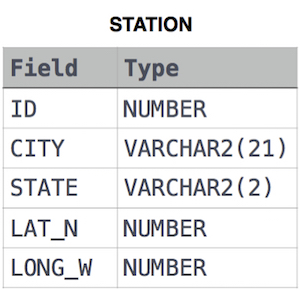
where **LAT\_N** is the northern latitude and **LONG\_W** is the western longitude.
**Sample Input**
For example, **CITY** has four entries: **DEF, ABC, PQRS** and **WXY**.
**Sample Output**
```
ABC 3
PQRS 4
```
**Note** \
You can write two separate queries to get the desired output. It need not be a single query.
```sql
(SELECT
CITY, LENGTH(CITY)
FROM STATION s
ORDER BY LENGTH(CITY), CITY
LIMIT 1)
UNION
(SELECT
CITY, LENGTH(CITY)
FROM STATION s
ORDER BY LENGTH(CITY) DESC, CITY ASC
LIMIT 1)
```
##
## Weather Observation Station 20
A [*median*](https://en.wikipedia.org/wiki/Median) is defined as a number separating the higher half of a data set from the lower half. Query the *median* of the *Northern Latitudes* (*LAT\_N*) from **STATION** and round your answer to decimal places.
**Input Format**
The **STATION** table is described as follows:

where *LAT\_N* is the northern latitude and *LONG\_W* is the western longitude.
```sql
SELECT ROUND(LAT_N,4)
FROM (
SELECT
LAT_N,
ROW_NUMBER() OVER (ORDER BY LAT_N) AS row_num,
COUNT(*) OVER () AS total_rows
FROM STATION
) AS subquery
WHERE row_num IN (FLOOR((total_rows + 1) / 2), CEIL((total_rows + 1) / 2));
```
##
## New Companies
[Question Link](https://www.hackerrank.com/challenges/the-company/problem)
Each of the companies follows this hierarchy:
Write a query to print the company\_code, founder name, total number of lead managers, total number of senior managers, total number of managers, and total number of employees. Order your output by ascending company\_code.
**Note:**
* The tables may contain duplicate records.
* The company\_code is string, so the sorting should not be **numeric**. For example, if the company\_codes are C\_1, C\_2, and C\_10, then the ascending company\_codes will be C\_1, C\_10, and C\_2
**Sample Input**
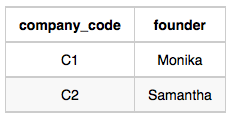
Company Table:
Lead\_Manager Table:
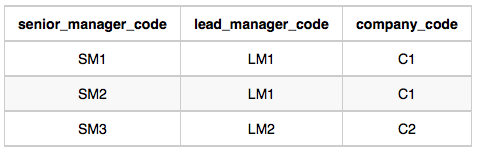
Senior\_Manager Table:
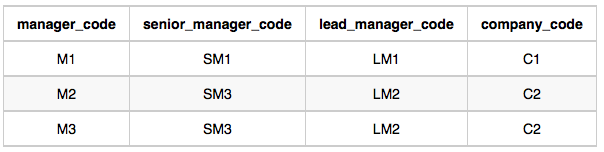
Manager Table:
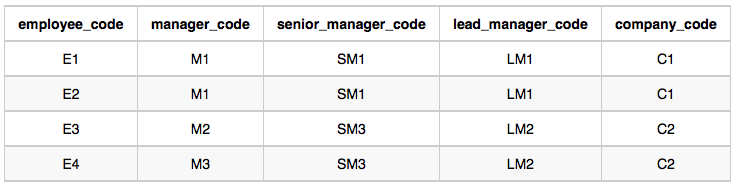
Employee Table:
**Sample Output**
```
C1 Monika 1 2 1 2
C2 Samantha 1 1 2 2
```
**Solution:**
```sql
SELECT
e.company_code,
c.founder,
COUNT(DISTINCT e.lead_manager_code) AS ld_mngr_cnt,
COUNT(DISTINCT e.senior_manager_code) AS snr_mngr_cnt,
COUNT(DISTINCT e.manager_code) AS mngr_cnt,
COUNT(DISTINCT e.employee_code) AS emp_cnt
FROM employee e
JOIN company c
ON e.company_code = c.company_code
GROUP BY e.company_code, c.founder
ORDER BY e.company_code
```
Link to[ Full Output](https://hr-testcases-us-east-1.s3.amazonaws.com/19505/output000.txt?response-content-type=text%2Fplain\&X-Amz-Algorithm=AWS4-HMAC-SHA256\&X-Amz-Credential=AKIAR6O7GJNX5DNFO3PV%2F20230605%2Fus-east-1%2Fs3%2Faws4_request\&X-Amz-Date=20230605T214559Z\&X-Amz-Expires=7200\&X-Amz-SignedHeaders=host\&X-Amz-Signature=f1e8cbde7ee433ed321c4258ef5194a6a4c1d1c3da61fde648339f5ccbd0a9b3)
---
# Agent Instructions
This documentation is published with GitBook. GitBook is the documentation platform designed so that both humans and AI agents can read, navigate, and reason over technical content effectively. Learn more at gitbook.com.
## Querying This Documentation
If you need additional information that is not directly available in this page, you can query the documentation by asking a question.
Perform an HTTP GET request on the following URL with the `ask` and `goal` query parameters:
```
GET https://dshub.gitbook.io/ds-hub/sql/sql-practice/popular-websites-for-sql-practice/hackerrank/sql-intermediate.md?ask=&goal=
```
`ask` is the immediate question: it should be specific, self-contained, and written in natural language.
`goal` is what the user is ultimately trying to achieve, the reason they need the answer. Sharing it helps GitBook give you a better, more relevant answer. A goal is most helpful when it describes the outcome the user wants rather than restating the question. For example, with `ask=how do I create an API token`, a goal like `automate deployments from our CI pipeline` lets GitBook tailor the answer to that use case.
The response will contain a direct answer to the question and relevant excerpts and sources from the documentation.
Use this mechanism when the answer is not explicitly present in the current page, you need clarification or additional context, or you want to retrieve related documentation sections.